OPEN SOURCE//MIT//FOR CLAUDE CODE
PHOSPHOR-OS : THE AGENT OS.
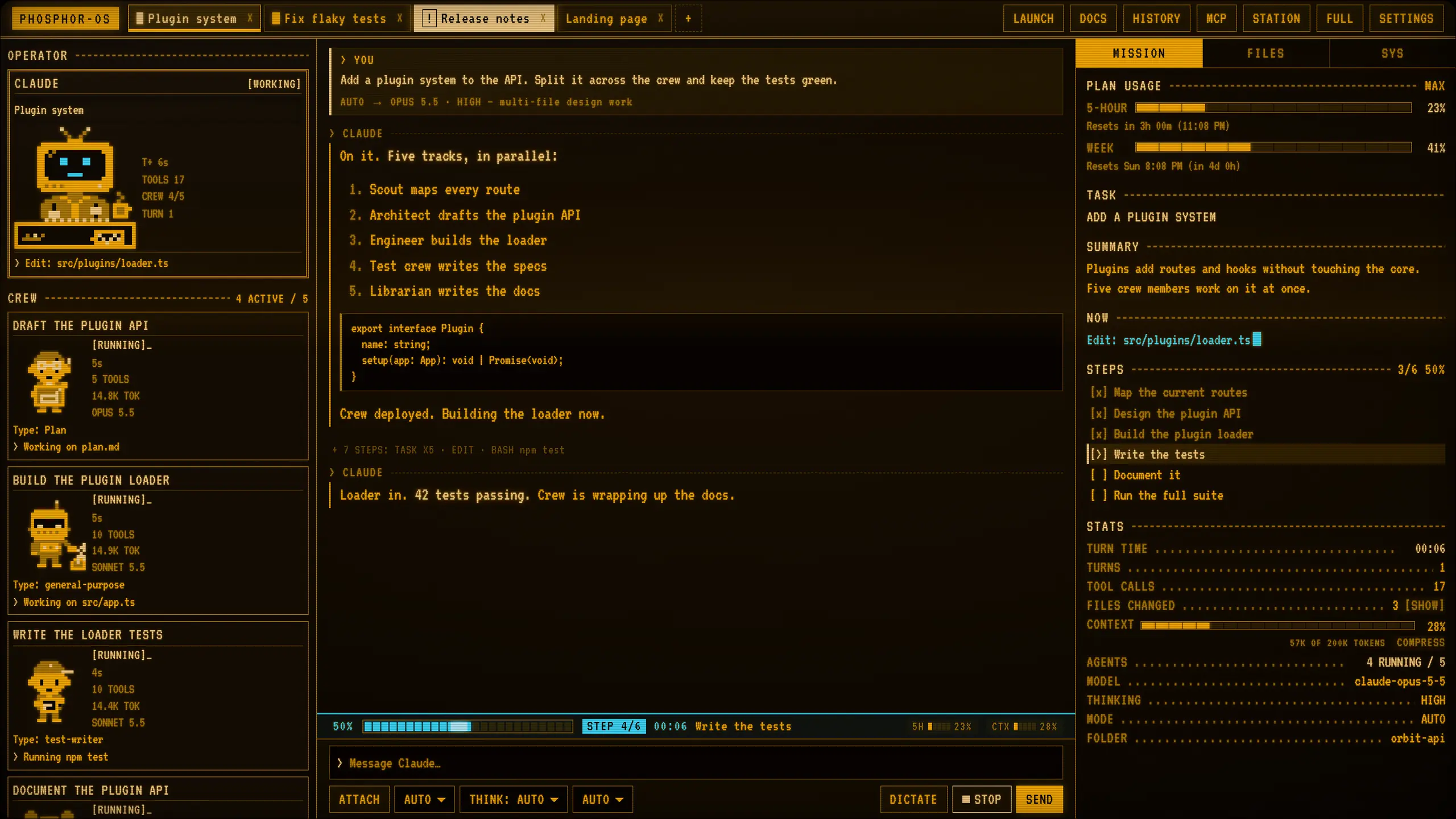
A whole desktop built around Claude Code. One screen shows what your agent is doing now, the steps ahead, the context window, the crew, the model, your plan and every file it touches.
Built on Omarchy. Powered by Claude Code. Amber phosphor on black.

01 // SEE EVERYTHING
You always know what your agent is doing.
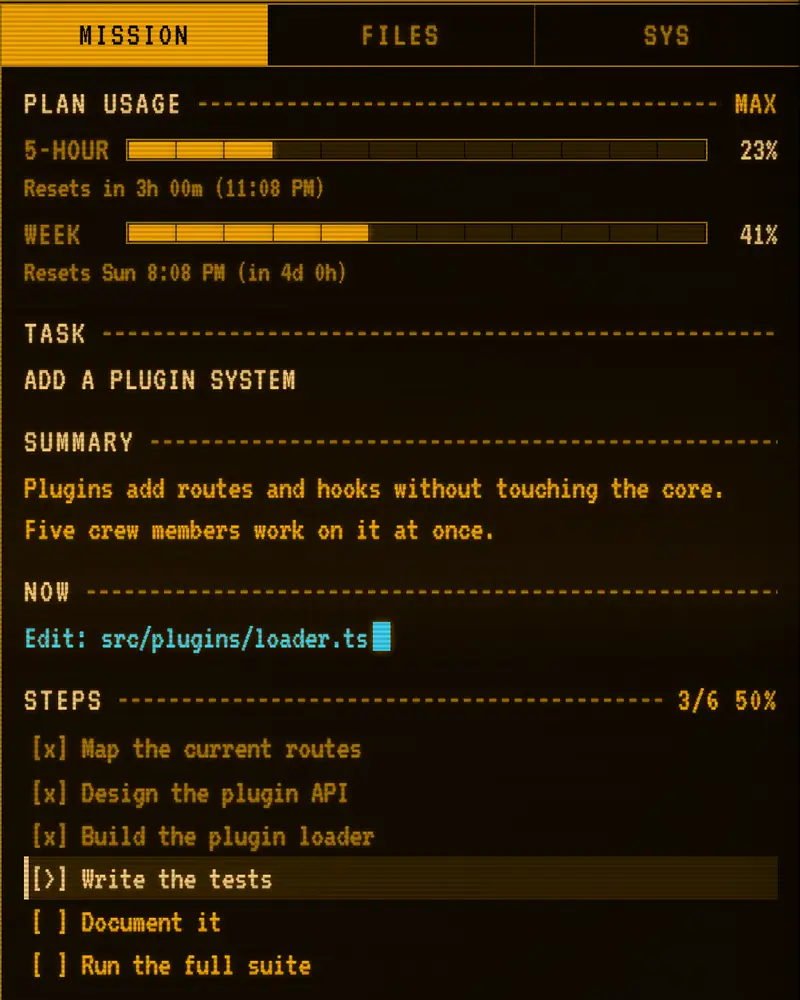
Agents work for minutes or hours. Most tools show you a spinner. Phosphor-OS shows you the job: what is happening now, what comes next, and what it costs you. All of it sits on one screen, live, next to the chat.
Replay of a demo session. Fake data.
NOW
What it is doing this second
The live line: reading, editing, running, thinking.
SUMMARY
The task in plain words
A two-line brief of the job, written by the agent as it works.
STEPS
Every step still ahead
The plan as a checklist, with a progress bar across the top.
CONTEXT
How full the window is
A gauge for the context window. Compress it with one button.
SUB-AGENTS
Every helper, running live
Each helper gets its own pixel-art crew card. Finished ones fold away.
MODEL + THINKING
Which model, how hard it thinks
Pick per chat, or let AUTO choose.
PLAN USAGE
How much of your plan is used
See the limit coming before it stops you.
FILES
Every file being changed
A list of what the agent touched. Undo from any message.
[ Every panel here is a panel in the app, fed by the same events Claude Code sends. ]
02 // JUST ASK
Change anything you want.
You can just ask Claude Code. Phosphor-OS is plain files on your disk, and the agent in it can read them. Describe the change, watch it happen.
TRY IT Simulation. Press a request.
Changes to the desktop go into a pack with a dry-run mode and an undo. Ask Claude to keep it that way.
INCOMING TRANSMISSION
Forty-five seconds aboard.
One live session, the whole desktop, tabs, AUTO, the phone, and a chat that rewrites its own clock. Sound on if you like.
READ THE TRAILER INSTEAD
- A chat starts a mission: add a plugin system. The HUD tags every part: plan usage, the summary, what it is doing now, the steps ahead, the sub-agents running, the files being changed, the context window, the model and thinking level.
- Title: PHOSPHOR-OS. The agent OS. Built on Omarchy. Powered by Claude Code.
- The whole OS: taskbar, notifications, one look. Firefox and the launcher in the same amber. The calendar, the docs editor, the screensaver.
- Chat tabs show done and needs-you. AUTO picks the model for each message. The same screen runs on a phone over Tailscale.
- Just ask Claude Code: a chat asks for a 12-hour bar clock, and the clock on the bar changes.
- End card: PHOSPHOR-OS. The agent OS. Open source. Bring your own Claude Code.
03 // THE WHOLE OS
Not an app. The whole desktop.
A themed window looks like a skin. Phosphor-OS restyles the system itself: the bar, the alerts, the launcher, the clock, the screensaver, the terminal and Firefox.
NOTIFICATIONS
THE BELL KEEPS COUNT
Amber cards stack bottom right. Walk away and they wait: the bell on the bar counts what you have not seen.
ONE FONT, ONE PALETTE, ONE WALLPAPER: EVERY PIECE
THE LAUNCHER
Super + Space. Apps, chats, files and commands in one search.
CLOCK + CALENDAR
Click the clock for a month view with your events under each day.
THE SCREENSAVER
Grid flight, a big clock and your crew on patrol. Any key wakes it.
SYSTEM
CPU, memory, GPU, network and drives, live.
DOCS
A Markdown editor in the same look, saved as plain files.
DICTATE
Press a key and talk. Speech turns to text on your own PC.
CREW
Every sub-agent gets a pixel-art sprite that works while it works.
TODAY
Your calendar and reminders in a side panel, read only.
04 // NEVER MISS A BEAT
Know the second it needs you.
Run five chats at once and still know which one to open next.
[DONE VS NEEDS YOU]
Every chat tab shows its state in plain sight. Done is calm. Needs you pulses. You see it from across the room.
[AUTO MODEL]
Set the picker to AUTO. A small fast model reads each message and picks the model and thinking level for it. Quick questions stay cheap, hard problems get the big model, and every reply shows the choice.
05 // FROM YOUR PHONE
Same desk. In your pocket.
Open the same screen on your phone. Check the job, answer a question, start the next one. It installs like an app and buzzes when an agent finishes or needs you.
- Private by design: it travels over Tailscale, inside your own network. Never on the public internet.
- Same HUD, same chats, same tabs, reshaped for a small screen.
- Fingerprint login and a long-lived session. Dictate by voice.
Needs a free Tailscale account (optional). The setup script turns on tailscale serve for you. It never turns on Funnel.
06 // HOW IT WORKS
Three layers. All of them open.
Phosphor-OS adds a look and a cockpit. It does not replace the engine.
PHOSPHOR-OS (the cockpit)
A small server on your own PC and a desktop app that show everything Claude Code is doing, live.
CLAUDE CODE (the engine)
The same tools, permissions, sessions, CLAUDE.md files and MCP servers you already use. Your agent is the real thing.
OMARCHY (the ground)
Arch Linux with the Hyprland window manager. Phosphor-OS ships an add-on pack: theme, bar, notifications, screensaver, keys. Every change is listed and can be undone.
OPTIONALBRING YOUR OWN GPU
Have a capable graphics card? Pick a local model from the same picker. It answers on your machine, with no plan limit and no network. Tools, edits and permission cards work the same.
| LOCAL MODEL | VRAM, APPROX. |
|---|---|
| QWEN 27B | about 18 GB |
| QWEN 35B MOE | about 16 GB |
| GEMMA 26B MOE | about 16 GB |
| GEMMA E4B | about 5 GB |
llama.cpp, written for AMD cards with ROCm. One command sets it up, another frees the GPU. A small model is weaker than Claude on long jobs.
YOUR PC // YOUR ANTHROPIC ACCOUNT // NO MIDDLEMAN
You sign in to Claude Code once, with your own Anthropic account. Phosphor-OS does not ask for a key and has no server of its own. It reaches your agents through the Claude Agent SDK.
07 // INSTALL
Three steps. About ten minutes.
On a fresh Omarchy 4 install. Every step has a dry run and an undo.
INSTALL.SH~/
STEP 1 SIGN IN TO CLAUDE CODE
claudeLog in once, then quit.
STEP 2 GET PHOSPHOR-OS
git clone https://github.com/CreativLLC/phosphor-os.git ~/phosphor-osSTEP 3 RUN THE SETUP
bash ~/phosphor-os/scripts/setup-linux.sh --dry-run # see every step firstbash ~/phosphor-os/scripts/setup-linux.shIt installs the app, the voice engine, the desktop app, the server as a service, and the amber look. It asks before anything that needs sudo, and you can run it again safely. Then log out and in.
FULL INSTALL GUIDE >UNDO: bash ~/phosphor-os/scripts/setup-linux.sh --undo
PHOSPHOR-OS
THE AGENT OS.
OPEN SOURCE. BRING YOUR OWN CLAUDE CODE.
github.com/CreativLLC/phosphor-os